Anyone who builds a site with a CMS (such as WordPress, Drupal, or Joomla) has probably heard the saying: use fewer plugins and your site will load much faster. For example, if I want a Lightbox effect on my site, I can manually add the jQuery code, or I can just install a plugin. Both methods achieve the same result, but they can make a noticeable difference in how fast the site loads.
Why Does Using Plugins Make a Site Slower?
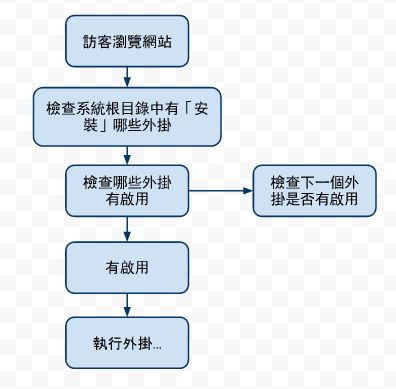
Why would using plugins slow a site down? Why would the same feature slow the site more as a plugin than if I added it by hand? Is this some kind of mechanism that punishes lazy people?! Actually, none of those. The reason plugins slow a site down is simple. Most CMS plugins are written with a hook mechanism. In other words, the CMS itself provides a set of APIs for developers to use. You can think of them as events in object-oriented programming: when something happens in the CMS, some action may need to run. For example:When a post is published, if I want the post’s URL sent to my email, I need to use the API for publishing a new post and specify a function that sends an email when a post is published. In other words, when the “new post published” event happens, “send an email.”
Almost all CMS plugins are designed this way. When something happens, the plugin does not do the work directly. Instead, the system manages it centrally. That makes plugins less efficient, because they go through an extra step in the CMS, rather than running directly like manually written code.
Here is one example. Many people like to use Google Analytics, but they do not want to edit the theme files by hand to add the analytics code. So they install a plugin to add the analytics code for them quickly. This approach quietly slows the site down because of the CMS management layer. If you add the code to the theme files by hand, the impact is not very large.
How Can You Make a Site Faster?
There are many ways to speed up a site. Common ones include enabling Gzip, using a better host, and compressing images, and so on. But since this post is about plugins, I will focus on them.- Avoid plugins for anything you can do without one, such as Google Analytics, Lightbox effects, and tweet buttons.
- Remove any plugins you are not using. Even inactive plugins affect site speed.
Diagram ▼▼