I recently ran into a rather interesting little problem. A contest voting system we built had occasional users who couldn’t vote. The system was built with Laravel. Users could log in with Facebook to vote for a designated entry, one vote per day. We only collected the most basic Email and Name data, for the prize draw. Everything was fine during testing, but after launch, a few users complained that after voting they saw the error message “whoops looks like something went wrong,” while most users could vote normally.
When this happened, we asked the users for information such as the browser they used, their Facebook account, their email address, and the time they voted. Then we looked up that time in laravel.log, and sure enough!
[2016-11-22 22:21:27] local.ERROR: exception 'ErrorException' with message 'Undefined index: email' in /var/www/laravel/vendor/facebook/php-sdk-v4/src/Facebook/GraphNodes/Collection.php:201After seeing this error message, we had a few ideas:
- The user's Facebook account does not grant our Facebook App permission to access their email
- The user's Facebook account has no email, but that doesn't make sense, since you have to enter one when you sign up for Facebook, right?!
Later, I went back and reread the Facebook Graph API documentation. Yes, sure enough, you really have to read the docs carefully. Missing something can blow up in your face.
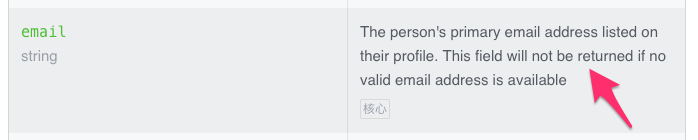
Facebook Developer Docs - Graph API User
But at this point I still wasn’t sure whether the email was missing because it was “unverified.” From past experience, you have to enter an email and verify it when you sign up for Facebook, or you can’t use the account at all. So I registered a new account myself. I found that, yes, Facebook does require an email when you sign up now, and yes, it does send a verification email. But you can choose to verify with your phone number instead, and then leave the unverified email address there!
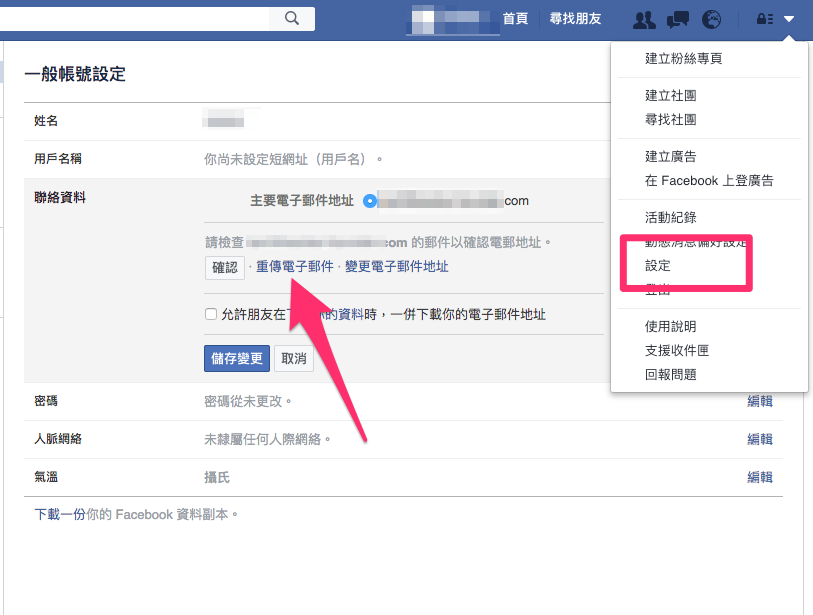
In other words, every Facebook account does have an email, but a user may have verified with a phone text message. So if the email is unverified, even though it exists, it won’t be sent to the App through the Graph API.
Here are three takeaways:
- When you write code, read the documentation word for word. There are always amusing notes hidden in it. It has never let me down.
- An email you get from the Facebook Graph API is always verified, so there's no need to resend a verification email.
- The Facebook Graph API may fail to return an email because the user hasn't verified it, so your code needs to handle that case. Also, judging from the error logs, this situation is not rare...