Did you know that Firefox has a great feature: you can subscribe to RSS feeds directly, without installing any add-on, and it loads pretty quickly? I’m not sure when this feature was introduced, I only recently discovered it :: ) Enough chatter, let’s get straight to how to subscribe to a website’s RSS feed with Firefox
Open Firefox and go to the website you want to subscribe to
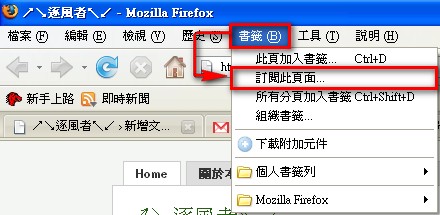
In the toolbar, click 【Bookmarks】 → 【Subscribe to This Page】 in that order
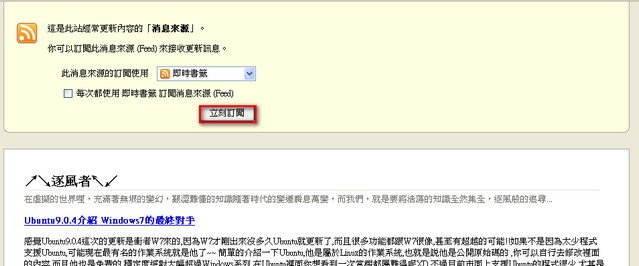
- It will take you to a page. Ignore the content there and click 【Subscribe Now】 directly
- In the “New Live Bookmark” dialog, click OK
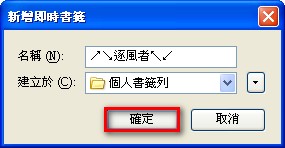
That completes adding the RSS feed.
Next, all you need to do is click the button with the symbol  on your browser to see new messages!
Isn’t this trick pretty neat? With this method, you no longer need to open a separate program to check RSS. You can read web pages and check messages right in the browser. However, it has one drawback: it only shows titles, not the article content, so you still have to click through to the website to read an article = = Still, RSS was already very convenient, so this feature feels a bit redundant. Or rather, it’s just too convenient! It makes me feel like we are gradually regressing. Maybe in ten years, we’ll operate computers just by talking to them XD