Recently I keep running into a problem while playing games.
Programs sometimes show an error.
The message says “0x000000 memory cannot be Read”.
I saw in a book that it indicates the memory read error location.
But the book didn’t say what to do about it.
So I looked online.
One method I found online is to use a cmd command to re-register the DLL files.
Here it is.
First, open the Command Prompt.
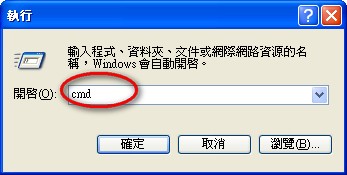
Enter: for %1 in (%windir%system32*.dll) do regsvr32.exe /s %1
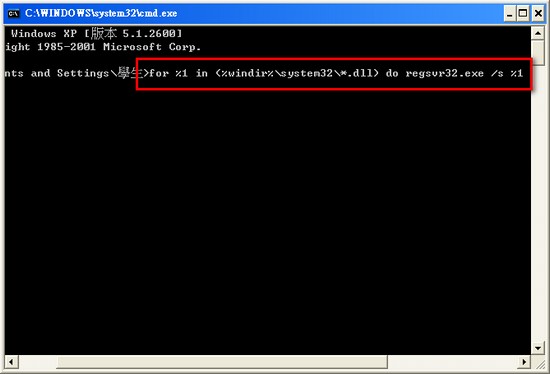
It will keep running for a while.
Once it finishes, you’re done.
Also, after your computer gets a Trojan or virus, I recommend re-registering the DLL files again.
Because viruses often infect DLL files.
And antivirus software, in order to remove the virus, has to delete that DLL file.
If you don’t re-register them at that point, your computer may end up running into errors.