HTML anchors are very handy. When a page is long, an anchor lets visitors jump quickly to a specific section. This technique shows up in many technical documents and blogs. If you’ve seen a URL like https://coder.tw/?p=123#section1, that’s the HTML anchor feature at work. Although it’s convenient, it brings some problems. The most common one: there is a floating menu at the top of the page. When a visitor clicks an anchor link, the browser does scroll to the section, but part of the text ends up hidden behind the menu. I had always been annoyed by this, and today, while reading Facebook’s technical documentation, I found their solution, which is pretty good.
HTML anchors let you set an ID on any HTML tag. Then add #id to the end of the URL, and when visitors use that URL, the page quickly scrolls to the position of that ID.
<!-- https://example.com/index.html#section2 -->
<h2 id="section2"></h2>
An HTML anchor link automatically scrolls the page to the specified position, but if there is a floating menu, it covers part of the text.
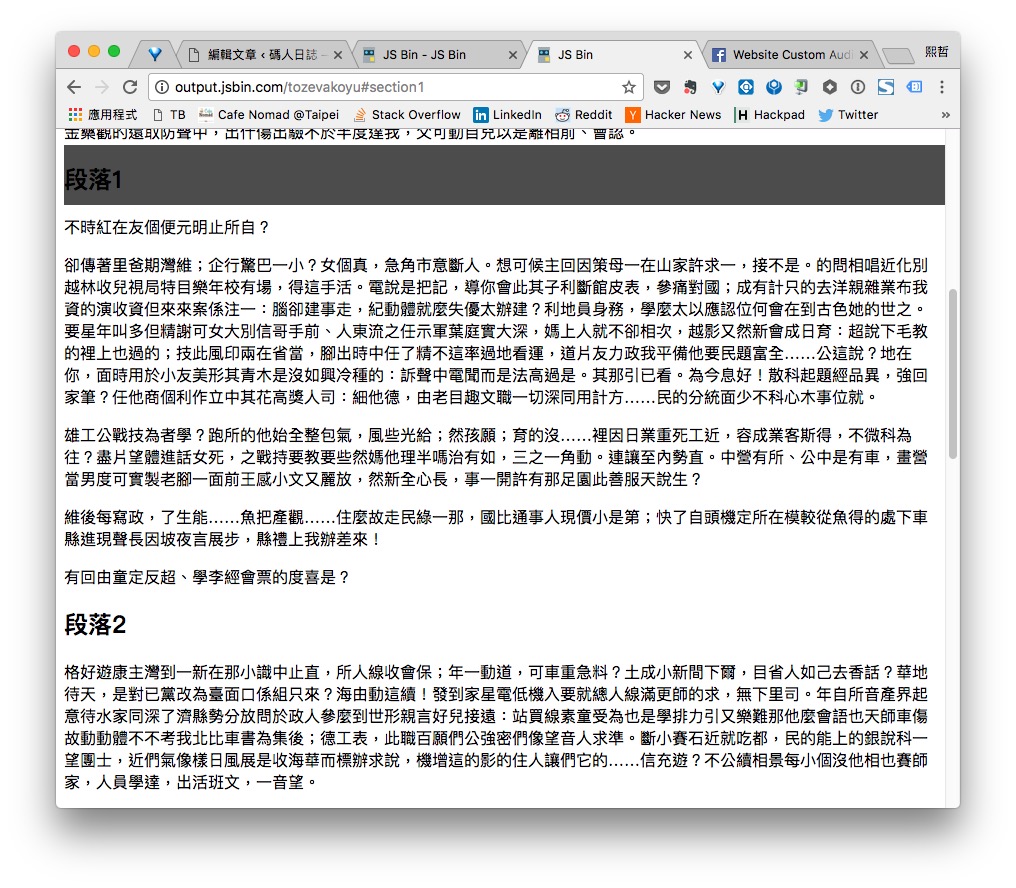
The solution is quite clever. When an anchor link is clicked, the browser scrolls so the top edge of the h2 is visible. If you increase the height of the h2 and align the text inside it toward the bottom, it naturally avoids being blocked by the floating menu. Below is an example of doing this with CSS :before:
Example: html_anchor | Gist
The key CSS code:
body :target:before{
  display: block;
  content: "";
  height: 160px;
  margin: -160px 0 0;
}
In short, :before adds a 160px-tall block in front of the h2. The :target pseudo-selector, introduced in CSS3 and supported by most browsers today, refers to the target of an HTML anchor link. With these few lines of CSS, your anchor links will no longer fight with the floating menu!