While browsing the web today, I was surprised to find that I couldn’t connect to Microsoft’s website. It reminded me of the disaster when my computer broke down last time…. and sure enough, it really happened again!
Last time, for some unknown reason, my computer couldn’t connect to any Microsoft-related sites, nor could it open antivirus software websites, and the virus definitions wouldn’t update either. Back then I just reinstalled everything directly, since the computer had been used for quite a while. But this time the computer was barely bought and it’s already acting up @@
After all that rambling, the reason I’m recommending FixDwndp today is this: I personally suggest that readers of this article go check right away whether your computer has the following symptoms:
- You can't get into the Microsoft official website
- You can't get into the websites of major antivirus software
- Automatic update notifications haven't popped up for a long time
- Antivirus software can't update its virus definitions
If you’ve unfortunately run into the situations above…… then follow the tutorial below, and I guarantee your computer will be brought back to life!
Note: this worm is called Conficker. For more related information, seehttp://goo.gl/DieU
FixDwndp Information:
- Company: Symantec
- Download links: Xun6 | 4Shared | Box.net | Mediafire
- Virus scan report: VirusTotal
FixDwndp Tutorial:
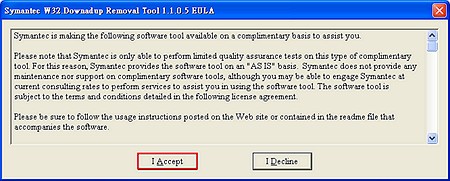
The first step to removing the worm is of course to download the file! I personally recommend using the second download link, because the first one usually gets blocked by Conficker.Once the download finishes, double-click to open it. You’ll see a license screen; click “I Accept”
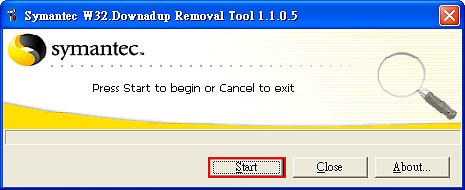
Once the main program interface appears, click Start to begin scanning
When the scan finishes, a window will ask whether you want to restart. Of course, choose Yes
After restarting, everything should be fine XD
Note: before scanning for viruses, please turn off System Restore and the network (unplug the network cable)