Sometimes you need to generate a file of a specific size for testing network speed, disk read/write performance, or program performance. The first thing that comes to mind is probably dd, right? But when you generate files with dd, don’t you find it slow? Also, did you know that besides dd, you can also use truncate and fallocate? This post briefly explains the methods you can use to generate a large file, how to use them, and the differences between them. Note that the contents of the files generated here are meaningless.
When it comes to generating large files, the command most often mentioned is dd. dd originally copies data from one place on a disk to another, similar to cp, but dd works at the lower level of disk sectors, so it doesn’t miss any information. We can also make use of dd: copy a 1MB block with dd 1024 times, and you have a 1GB file!
“if” means input file, and “of” means output file. Linux has a special file, /dev/urandom, which generates random data. The following command repeats 1M blocks of /dev/urandom 1024 times and writes them to a file named 1G.img.
dd if=/dev/urandom of=1G.img bs=1M count=1024
However, this is too slow. We can change if to /dev/zero to speed things up, because random data has to be generated by the system, while writing zeros directly is a bit faster.
dd if=/dev/zero of=1G.img bs=1M count=1024
Even with /dev/zero, you will find it is still not fast enough, and the larger the file you want, the slower it gets. The reason is simple: dd actually reads the content from the disk’s sectors and copies it, so its speed depends on disk I/O, and everyone knows disk I/O is slow… If we want to solve this and make the speed of generating a fake file independent of its size, we can use sparse files. In short, dd with /dev/zero actually creates a file with content, but we can also create a file that “claims” to be 10G in size.
Both dd and truncate can do this:
dd if=/dev/zero of=1Gfile bs=1 count=0 seek=1G

truncate -s 1G 1Gfile
If you run ls -lh, you will see that the file is indeed 1G, and if you download it, you will indeed get a 1G file. But if you check its actual disk usage with du, you will find that it is basically empty! So you can actually create a file larger than your disk. For example, on a disk with 100G of capacity, you can create a 10TB file.
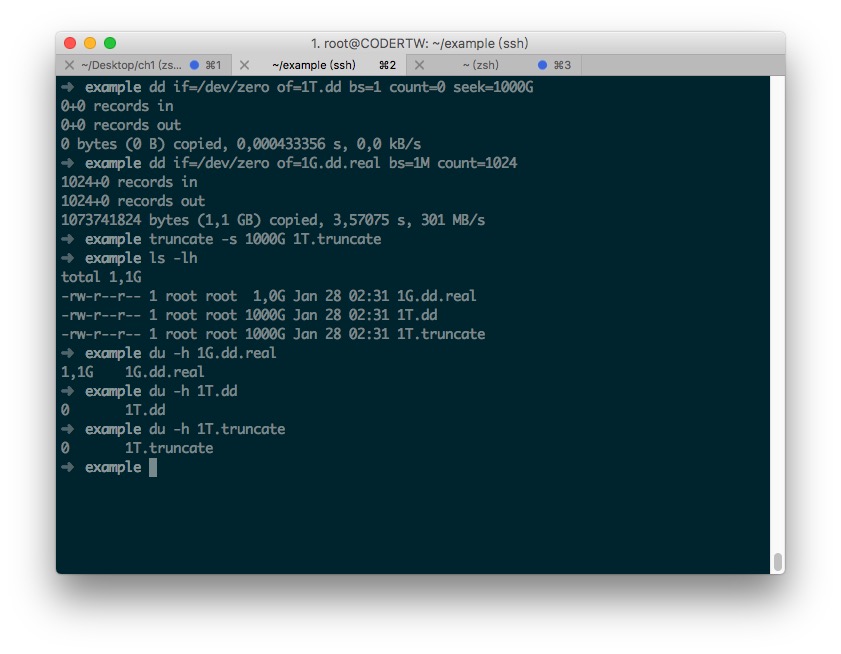
If you want generation to be fast and you want the file to actually occupy disk space, you can use fallocate. It really requests the specified space from the disk, but it does not actually use that space. fallocate is the solution we recommend.
fallocate -l 10G 10G.img
If you use macOS, you can use dd or mkfile. macOS does not support truncate and fallocate.
mkfile -n 1g 1G.img
Here is a speed comparison for your reference.
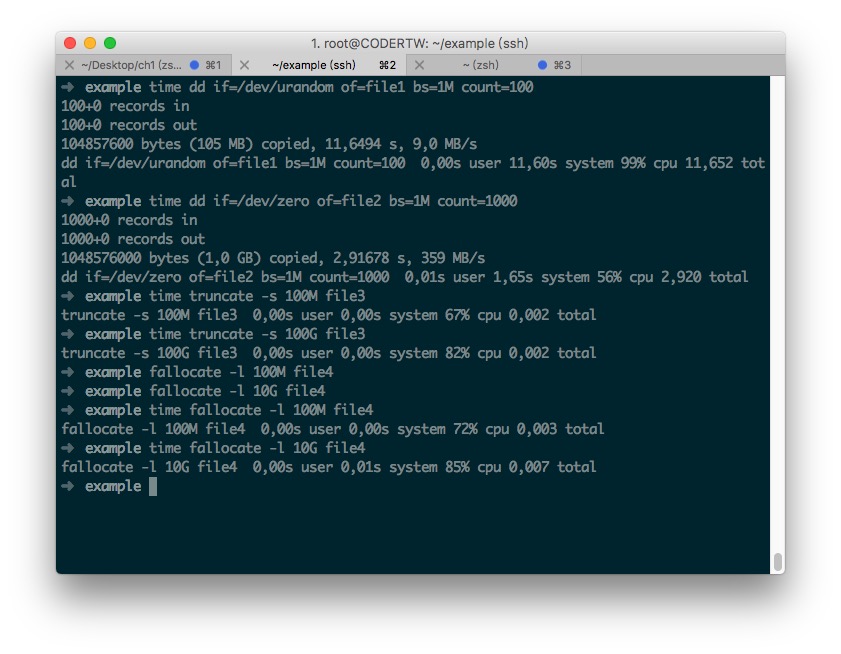
Note: Although the files created by truncate and fallocate have no actual content, this does not affect disk read/write speed or network download speed tests. I am also still thinking about where sparse files and files with actual content would differ, so if anyone has information on this, please share it with me!!