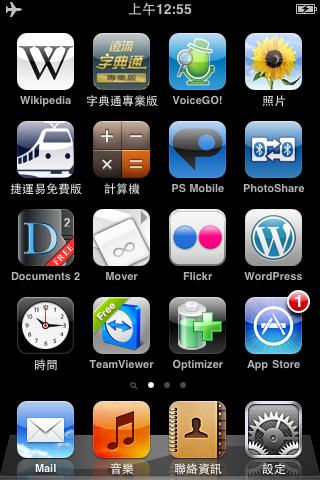
When I went out with my elementary school teacher once, she was puzzled about why I always replied to her emails so quickly. It was only after seeing the iPod Touch that she understood. I’m checking my mail almost all the time: as soon as I get up in the morning, when I’m in the bathroom, and basically whenever I have internet access, my iPod Touch is running ^^. Also, since iOS 4 came out, it has become much easier to transfer e-book files to the iPod Touch, so now I read e-books whenever I’m out~
Advantages of the iPod Touch/iPhone
- Calendar, so I know what I need to do
- Notes and mind-mapping software, so I can quickly jot down ideas I have when I'm out
- Email, so I can check every message faster (obvious, right?)
- Internet access, so I can look things up anytime
- iBook, for reading PDF files packed onto the iPod Touch
From here on, I’ll refer to the iPod Touch as iTouch.
- Quickly scroll back to the top
When you’re looking at something on the iPod Touch, it often happens that you scroll far down and then find it troublesome to scroll back up. For example, when you’re browsing contacts with lots of entries, scrolling all the way back up from the bottom is a hassle. In that case, just lightly tap the top right of the screen. See the picture below.

- Don’t turn off your iPod Touch
When I first got the iTouch, I was in the habit of turning it off as soon as I finished using it, to save power. But I found that turning it on and off all the time was annoying, and it didn’t really save much power, because it barely uses any battery in standby mode. So now I almost never turn it off. That doesn’t mean you should never turn it off, though. Personally, I recommend turning it off once a day, which clears its memory and speeds it up. Or, if you really won’t use it for a long time, go ahead and turn it off~
- Turn off Spotlight to improve performance
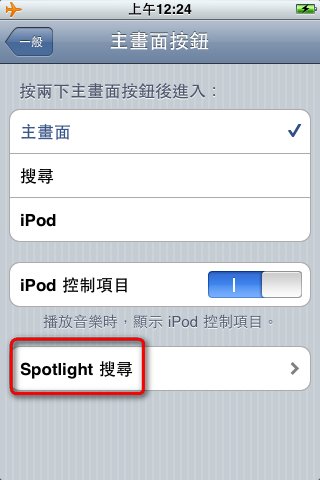
Anyone who has updated their iTouch to iOS 4 has probably noticed that it became really slow, right? Even though iOS 4 doesn’t have multitasking on the iTouch, which in theory shouldn’t use up much performance, for some reason it’s very slow. Recently, while browsing forums, I saw a site owner suggest a fix: turn off Spotlight. I tested it myself, and it really works.
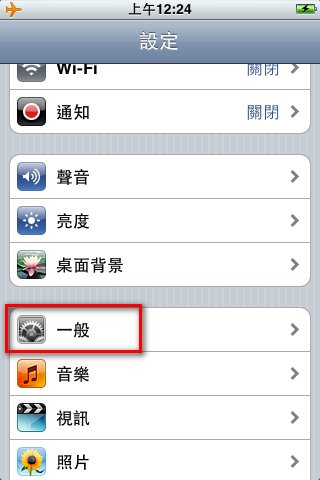
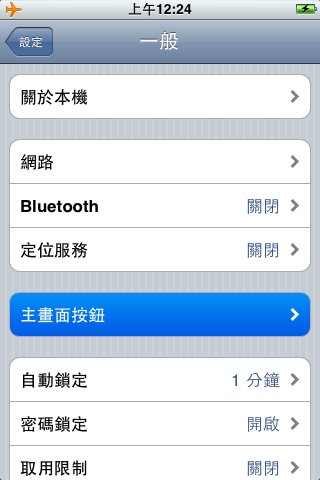
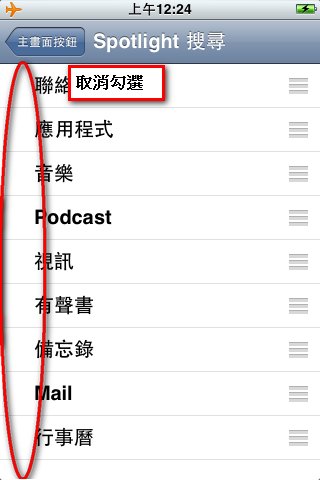
Steps: Settings->General->Home Button->Spotlight, then uncheck all of the options.
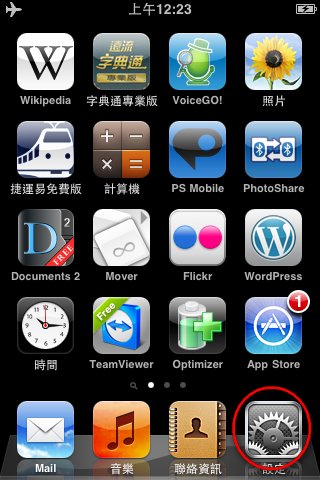 ▲ Tap the Settings button
▼ Tap General
▲ Tap the Settings button
▼ Tap General
 ▼ Tap Home Button
▼ Tap Spotlight
▼ Uncheck all of the options
 4. Turn off unused features to save power
To be honest, the iPod Touch really eats up battery. If you only use it to listen to music, it can last a long time. But you didn’t spend so much money on an iPod Touch just to use it as an MP3 player, right? (If you only bought it as an MP3 player, I can only say you’re being far too extravagant = =.) If you use the iPod Touch to browse the web or play games, you’ll notice the battery draining after about an hour… So here I’ll show everyone how to save power, so you can keep it for when you really need it.
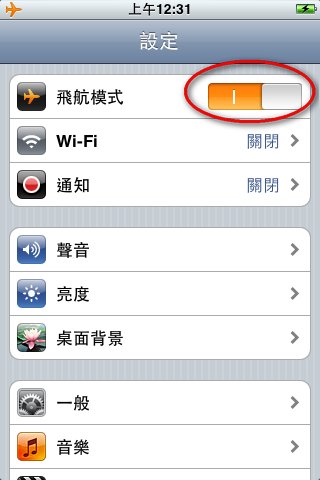
A lot of people are in the habit of leaving Wi-Fi and Bluetooth on. When you’re not using them, I recommend turning both off, since they really waste power. iOS 4 also added Airplane Mode to the iPod Touch, which is very handy: tap Airplane Mode once and it automatically turns off Wi-Fi and Bluetooth. It’s incredibly convenient, since one button switches off both features at once. So updating to iOS 4 really is worthwhile.
▼▼ Airplane Mode
- Make good use of the built-in timer on the iPod Touch
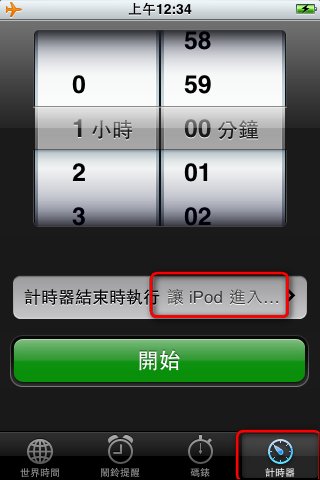
The Clock app on the iPod Touch has a Timer feature, which is very handy: it lets you set how long until the iPod Touch automatically goes to sleep. What do I use it for? Before bed, I almost always need to listen to music to fall asleep, but playing music all night doesn’t feel right 0.0. That’s when the timer comes in handy. I set it to put the device to sleep after X hours, and then I can go to bed with peace of mind~
- Use two fingers to zoom in (out) on web pages and photos of pretty girls
This is the multi-touch technology Apple is so proud of. When you’re browsing web pages, the iPod Touch has an inherent weakness: its screen is small, so reading web pages can feel like you’re going blind. In that case, place two fingers on the screen and spread them apart (one finger moves left and the other moves right, don’t get the wrong idea… just spread them apart…..). You’ll see the screen get bigger. Suddenly I had a rather lewd thought… everyone knows what I mean….
- Play music while the screen is locked
The iPod Touch has a handy feature: after a period of inactivity, the screen locks, and you have to slide the slider to the right to unlock it. This keeps you from pressing things by accident. But sometimes this handy feature becomes inconvenient. For example, when you want to play music, having to unlock the screen first is a bit of a hassle. There’s actually a quick way to play music: from the lock screen, double-press the Home button (the iPod Touch’s only physical button). A simplified music player will appear.

- When the iPod Touch freezes, hold the Power button and the Home button for a while
Once, for some reason, my iPod Touch froze as soon as I opened an app. It stopped working completely, and I couldn’t even restart it by pressing the Power button. Then I remembered a method from a book: hold down the Power button and the Home button until the Apple logo appears. This method is practically a cure-all for freezes, so if yours freezes, try it. Just note that you have to hold the buttons down for quite a while before the Apple logo shows up.
- Press the Power button and the Home button together and release them to take a screenshot
Anyone who writes a blog is probably no stranger to screenshots~ On Windows, people often use programs like FSCapture or PicPick to take screenshots. So how do you take screenshots on iOS? It’s actually very simple, and you don’t need to install any program. Press the Power button and the Home button at the same time and release them. The screen will flash, which means the screenshot was taken. The image is saved to Photos->Saved Photos.
That’s about all the tips I can think of right now. Some of them are pretty common knowledge, but that’s not the point. The point is that the iPod Touch is really convenient. Its drawbacks are the small screen and the lack of a 3G network, but the iPad solves both problems~ Once I’ve saved up enough money, I’m going to buy an iPad and a computer^^
By the way, I heard the day before yesterday that a product called “Apple Skin” will be released next month. Its function is to let the iPod Touch take a SIM card so it can be used as a phone. The price is about 300 to 500 RMB. I might consider buying one when it comes out, but products from mainland China… I’m a little nervous about them.