Sometimes when you’re using a computer, you’ll notice the input method starting to act strangely, like pressing the A key and getting a B. What’s going on? It might be that the “mapping” setting of your input method has been messed with! Who would do that? Maybe someone else who uses the same computer, or maybe a virus playing a prank on the PC. Either way, this problem is actually easy to fix.
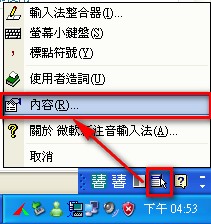
- Click the “Tools” menu in the language bar at the lower right, then select “Properties”
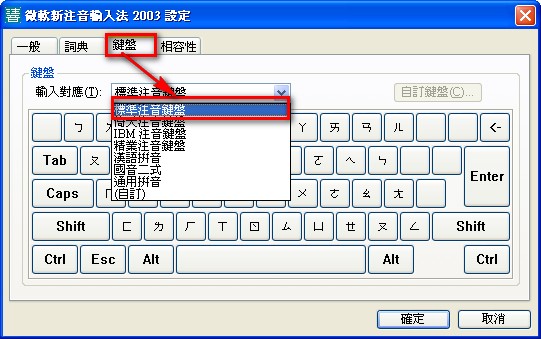
- Select “Keyboard,” then change the input mapping to the standard Zhuyin (Bopomofo) keyboard, and you’re done.
Actually, this problem is quite easy to solve.
But when I first ran into this problem, I didn’t understand it at all.
I just wondered what had happened to the computer, and so on.
Later, I saw a friend using it and only then learned that “computers are full of mysteries” (a playful twist on a Chinese phrase meaning “full of hidden mysteries”).