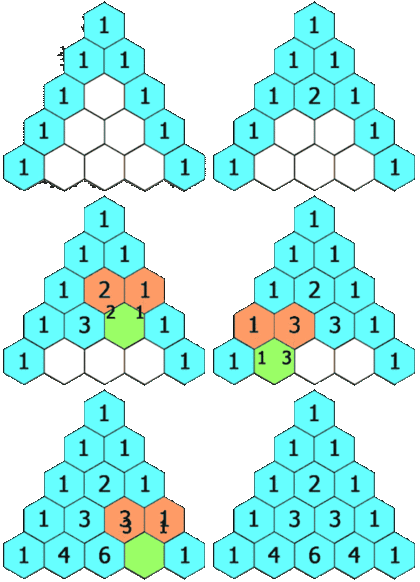
The image above is from Wikipedia and is used to explain Pascal’s triangle.
Today’s topic is the so-called Pascal’s triangle. Some people also call it Yang Hui’s triangle or Jia Xian’s triangle. The first row’s first entry is “1”. Each number below equals the sum of the number to its upper left and the number to its upper right. If there is no number to the upper left or upper right, it counts as 0. For example, the second row has two numbers, “1, 1”. The third row is “1, 2, 1”. And this triangle can extend infinitely.
Wikipedia article on Pascal: http://goo.gl/nliGj
To be honest, though, the principle above…. isn’t really related to the method used to solve this problem. That’s because the numbers in Pascal’s triangle can actually be calculated with a formula. I have to thank Cang Hai for pointing this out. Otherwise, I might have thought I could only dumbly write a program that adds the upper left and upper right numbers…..
Cang Hai: http://jeremy.tfeng.org
Calculating with Pascal's Formula
Here is Pascal's calculation formula: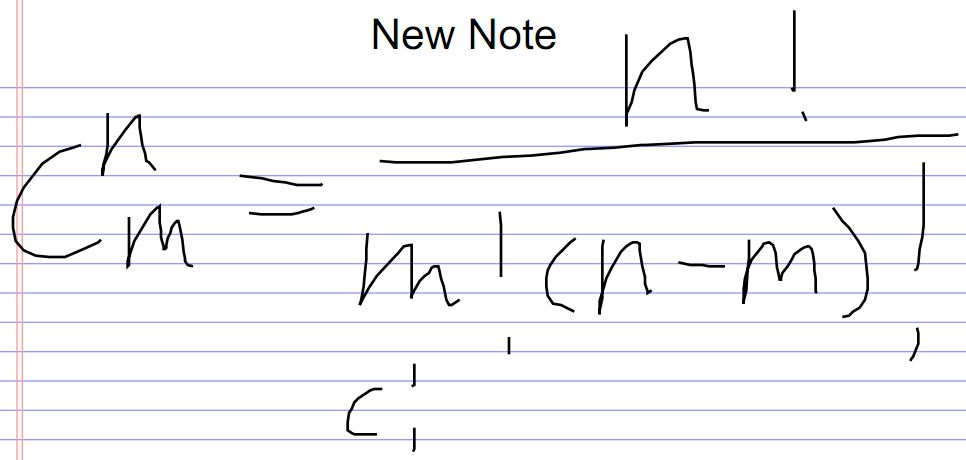
As for n and m, they come from the row and column. Because Pascal’s triangle is made of numbers, you can identify which row and which column each number is in. All numbers start counting from 0, so row number = n and column number = m. Also, n! and m! refer to factorials, which means 123….*n (and likewise for m).
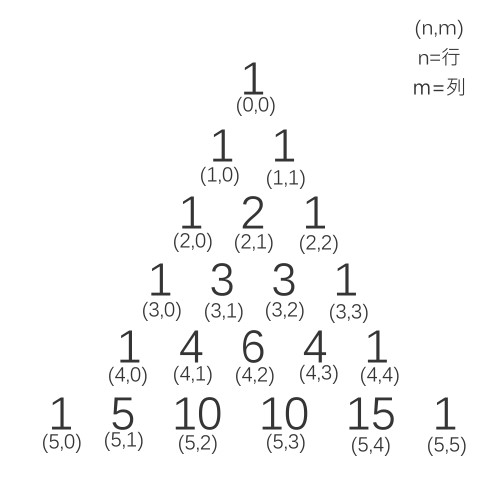
Once you understand the formula…. just go ahead and write the program XD Because with a formula, all of this is actually very easy to write 0.0
P.S. Thanks to reader HyDroGen for the correction. The (5,4) in the image above should be 5, not 15.
PHP Code
http://pastie.org/2259899
function factorial($x){
$temp=1;
for($i=1;$i<=$x;$i++){
$temp*=$i;
}
return $temp;
}
?>