My computer froze. What do I do? Surely I’ll have to restart again……………
Here’s a method for you that clears a freeze without restarting.
The only requirement is that your keyboard works and your mouse can move XD
P.S. You can press Num Lock on your keyboard to check whether the keyboard is working.
To clear the freeze, first open Task Manager (Ctrl+Alt+Delete).

After Task Manager opens, switch to the “Processes” tab.
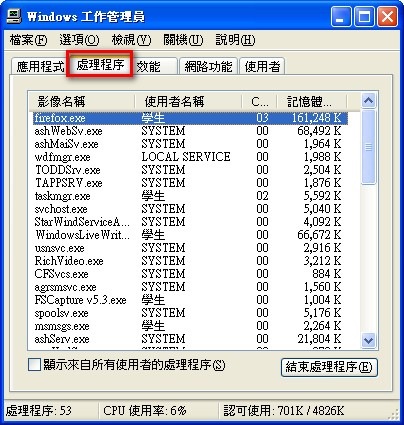
Find explorer.exe in the list of processes at the bottom, and click “End Process”.
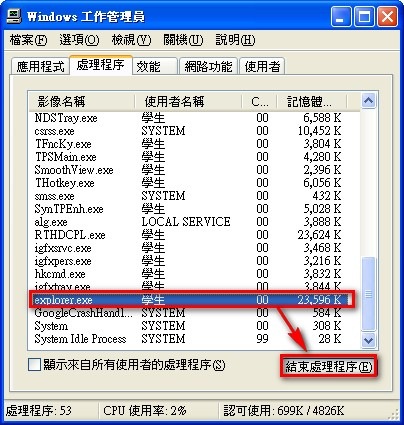
You’ll notice your desktop is gone and only the wallpaper is left. Don’t panic, though. Follow the next step and your computer will be fine.
Next, switch to the “Applications” tab, click “New Task”, type explorer.exe, and then click OK.
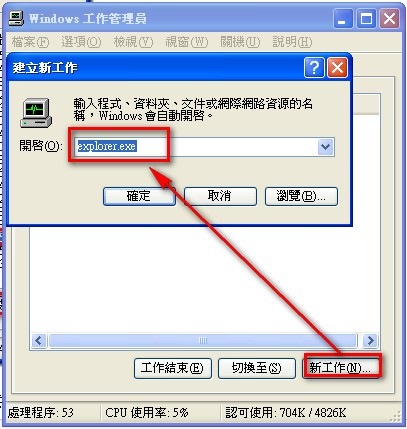
The principle behind this method is actually simple. The explorer process manages the Windows desktop. When the computer freezes, the problem very likely lies in this process. So by closing it and starting it again, you can fix most freezes.