For the past few days I’ve been writing a small program to organize contacts, so I’ve been researching quite a few things. While working on the database side, I wanted to guard against so-called SQL injection, where a malicious string is placed in a parameter to attack the database. So I applied some basic defenses. The following is how to add some basic protection against SQL injection~
Also, yesterday someone on my site questioned whether building strings by concatenation causes SQL injection. Let me explain here. Yes, concatenating strings can lead to SQL injection, but if you check the data users input, you can avoid the problem. I think people who consider concatenation risky probably either don’t understand SQL injection well enough, or believe that avoiding concatenation is the only way to fully prevent it. The first case is acceptable, but the second is quite serious. Many websites have poor security because a group of people who pretend to know more than they do are involved. Sorry for being a bit blunt, but it’s the truth: if you don’t check any of the data users input, then it’s only natural for your website to get attacked. There is also no way to block SQL injection 100%; you can only increase security. I suspect that reader might come to argue with this article, saying the methods I teach have no effect at all on SQL injection? We’ll see~
1. Enable magic_quotes_gpc
magic_quotes_gpc is a basic, built-in PHP measure against SQL injection. It automatically processes all the information passed through GET and POST, adding escape characters (backslashes) in front of certain symbols such as single and double quotes, which prevents SQL injection. However, magic_quotes_gpc has one drawback: if the data a user submits is not an attack string, it still gets processed while the option is on. As a result, the user's input can end up different from what they typed. So whether to enable magic_quotes_gpc is up to you.References:
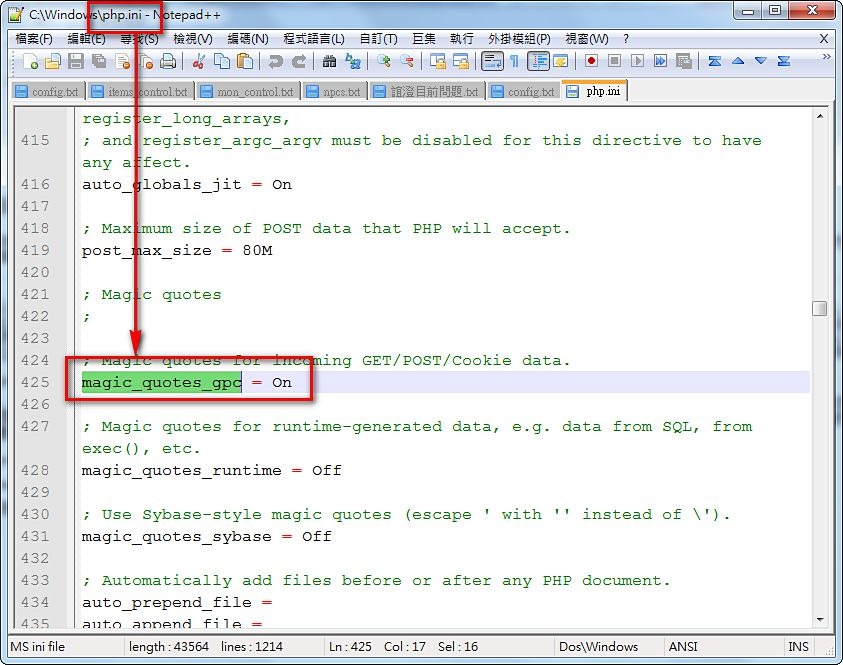
Enabling magic_quotes_gpc is easy. Open your php.ini and search for "magic_quotes_gpc."Change magic_quotes_gpc=off to magic_quotes_gpc=on
It is enabled by default.
2. Process the Incoming Data
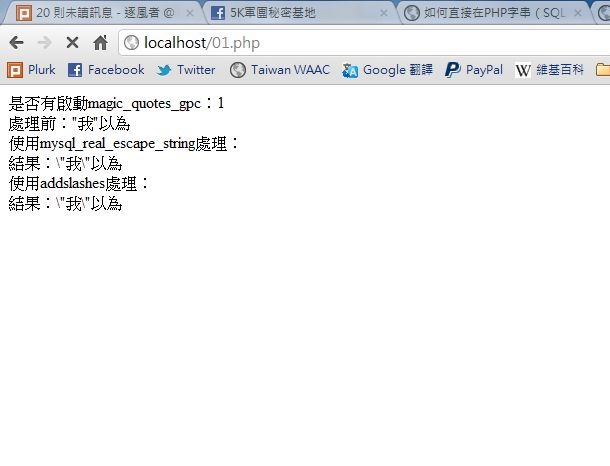
As mentioned earlier, magic_quotes_gpc processes incoming data, and sometimes it processes data it shouldn't, which can cause trouble. That's why some people turn it off, and that's fine too. Here I'll introduce two PHP functions that achieve the same effect as magic_quotes_gpc but with more flexibility: magic_quotes_gpc processes "all" GET and POST data, while the functions introduced here can be applied selectively~The two functions are mysql_real_escape_string and addslashes. They are similar, but mysql_real_escape_string does more and handles more data, while addslashes only handles “single quotes, double quotes, and backslashes.” Which one you use is up to you. Also, before using either function, check whether magic_quotes_gpc is enabled with the get_magic_quotes_gpc function. If magic_quotes_gpc is already on and you use these functions anyway, the data gets processed twice, and that causes problems.
Both functions are used by passing the variable you want to process directly as the argument. As for get_magic_quotes_gpc, it returns 0 when the option is off and 1 when it is on.
References:
- http://php.net/manual/en/function.get-magic-quotes-gpc.php
- http://php.net/manual/en/function.mysql-real-escape-string.php
- http://php.net/manual/en/function.addslashes.php
- http://goo.gl/Umwh2
echo '是否有啟動magic_quotes_gpc:' . get_magic_quotes_gpc();
$content='"我"以為';
echo '處理前:' . $content ;
echo '使用mysql_real_escape_string處理:';
echo '結果:' . mysql_real_escape_string($content);
echo '使用addslashes處理:';
echo '結果:' . addslashes($content);