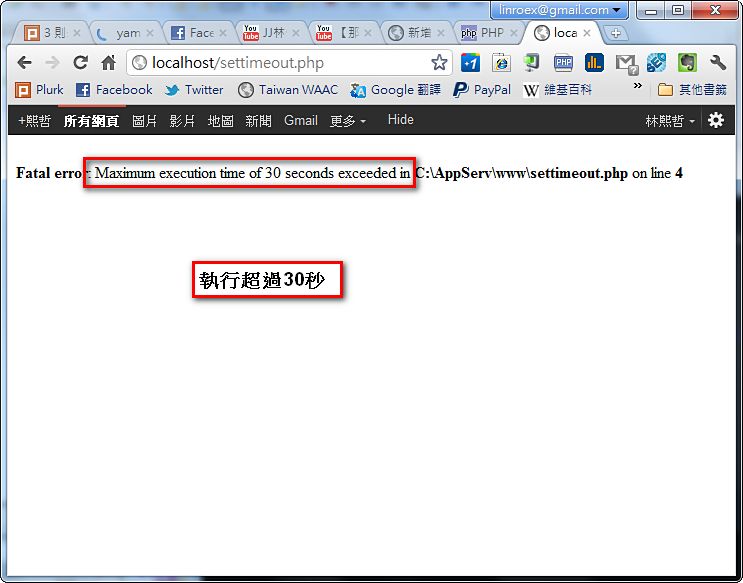
By default, PHP has a 30-second execution limit. When a program runs longer than 30 seconds, you get an error like this: “Fatal error: Maximum execution time of 30 seconds exceeded”. This is a safeguard against bugs, such as infinite loops or other strange code that could end up bringing the system down. However, sometimes your program really needs to run for more than 30 seconds. For example, you might be processing a very large file in PHP, such as a database backup that can be hundreds of MB, which takes a long time and can easily exceed 30 seconds. My earlier Plurk BOT and spider programs also ran into this easily. Here I’ll show you two ways to adjust this time limit.
Method 1: Edit php.ini
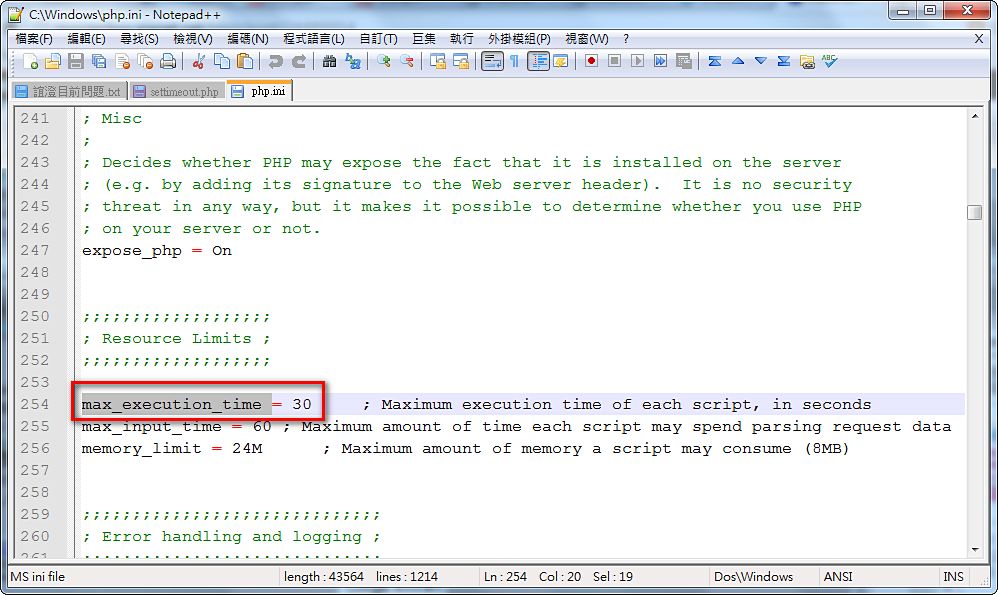
Editing the php.ini file lets you raise the execution time limit. The defining feature of this method is that it's a "global" change. Once you change the setting, "all PHP scripts" in the future will use this time limit. This has both pros and cons. The upside is convenience. The downside is that if your code has bugs, they will be harder to notice, and they may bring the system down.Open php.ini (/etc/php.ini) and search for “max_execution_time.”
The default is 30. Change the 30 to the time limit you want (in seconds).
Method 2: set_time_limit
Sometimes you're on shared hosting and can't edit php.ini, or you don't want every program to have no limit. In those cases you can use the set_time_limit function. It can be added directly to your code to set the execution time limit in a "soft" way, and the change is not global.Also, set_time_limit has no effect in PHP’s Safe mode.
set_time_limit(time_limit)The time limit is in seconds. To set no limit, use 0.
set_time_limit(0)As above, this means no limit.
It’s recommended to put this function at the very top of your code.
For the official documentation on set_time_limit: http://php.net/manual/en/function.set-time-limit.php