
dokoda offers a very special yet practical feature: it converts ordinary RSS feeds into full-text RSS. If you use a computer a lot, you probably know about RSS and subscribe to some feeds. If so, you’ll know that some sites don’t show their full articles in the RSS feed, to get people to visit the site. You have to click through to read the rest, which wastes a lot of time for people with slow connections. dokoda can convert those RSS feeds into full-text ones. Amazing, right! Now let Ting-feng show you around this site.
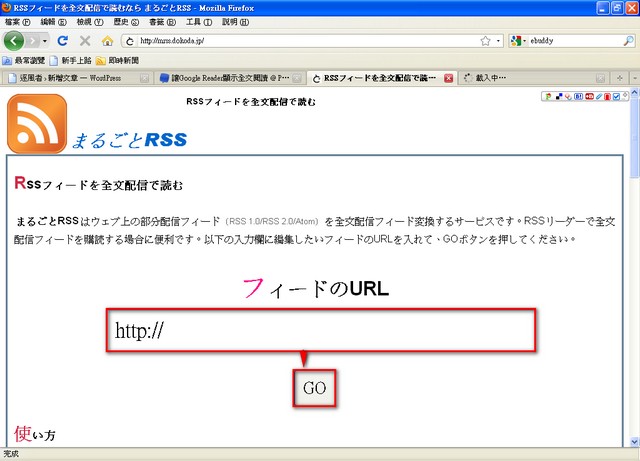
Actually, this site is very simple to use. Open it first.
After opening it, paste the RSS address of the site you want to convert into the "?????URL" field, then click GO.
Next, it takes you to a new window with a field labeled RSS? (direct display)??, and the converted RSS address is right there.
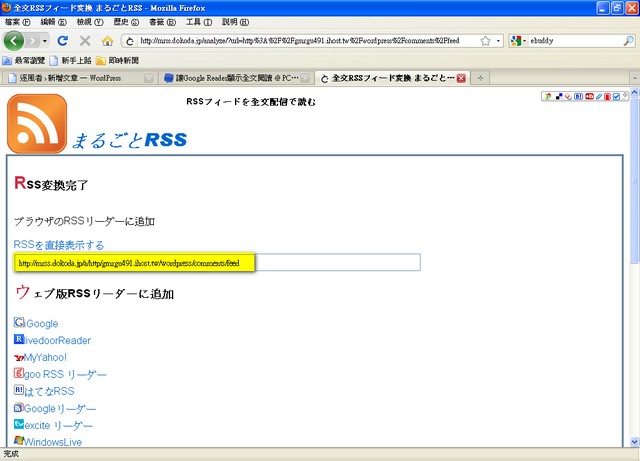
Just copy it and paste it into your feed reader.
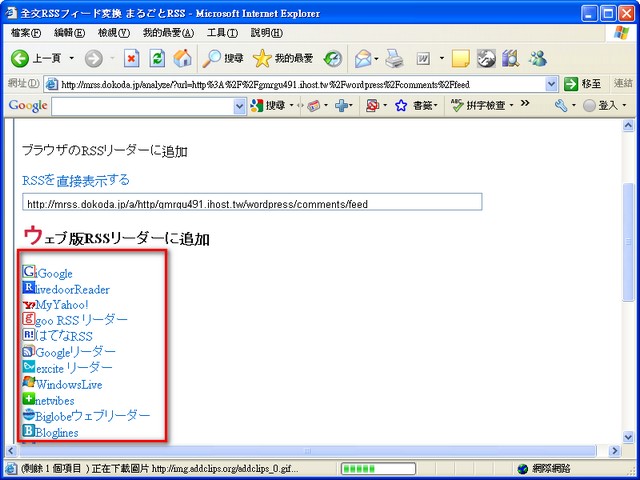
It also provides a feature for subscribing directly to several online feed readers. Google Reader, for example, is supported. You just go to the ??? edition RSS ????? Addsection and select the sites you want to subscribe to automatically.
?
?