In the previous article, “When CSS Meets Variables and Functions, It Becomes SASS: SASS Installation Tutorial”, I showed how to install SASS. In this article I’ll show you how to use SASS. It covers four of SASS’s main features: variables, mixins, extend, and nesting.
Before I introduce the four features, I’ll first explain how to compile SASS. SASS offers two ways to compile: manual compiling and watch compiling (–watch). Manual compiling means running a command to compile after you’ve finished writing your CSS. Watch compiling means pointing SASS at a folder, and whenever a *.scss file in that folder changes (added, overwritten, and so on), it compiles automatically. Personally I recommend watch compiling, since it’s more convenient XD, so I’ll only cover watch compiling here… ㄎ
SASS Compilation
Create a scss folder and a css folder.mkdir scss cssThen create a file named "style.scss" inside the scss folder. Note that even though the program is called SASS, the file extension is scss.
cd scssEnter the example code below into style.scss:touch style.scss
$text:15px;
body{
	font-size:$text;
}
Then go back up one level, and you’re ready to compile.
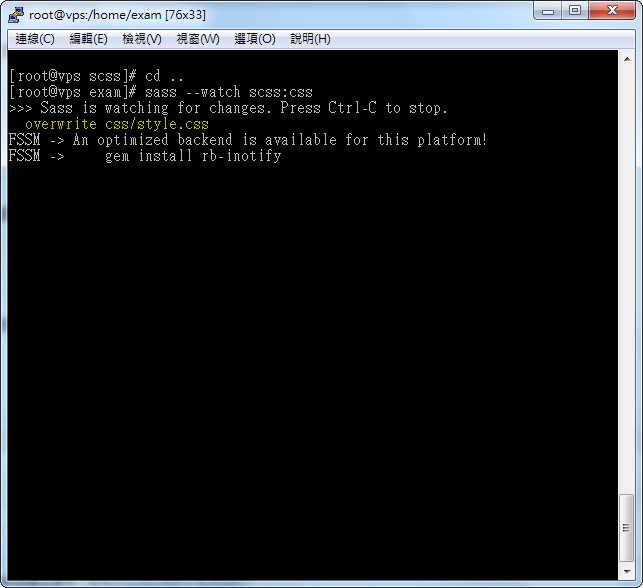
cd ..The command sass –watch scss:css means: watch the scss folder and save the compiled output to the css folder. It keeps watching the scss folder until you stop the program.sass –watch scss:css
Variables
A variable has to be declared before you use it. Declare its existence and give it a value, and then you can use it directly in your CSS.Also note that in SASS, variable names must start with $.
$text:15px;

body{
	font-size:$text;
}
#top{
	width:$text;
}
The code above declares a variable $text that holds 15px. Then font-size uses the $text variable directly.
Compiled result:
body{
	font-size:15px;
}
#top{
	width:15px;
}
The value of $text is substituted wherever it’s used.
That’s how variables work. You can also combine them with operators to do addition, subtraction, multiplication, and division, for example:
$width:500px;

#content{
	width:$width;
	height:$width*2;
	font-size:$width/10;
}
Compiled result:
#content{
	width:500px;
	height:1000px;
	font-size:50px;
}
Mixins (Functions)
SASS supports functions, and you can pass values into them. This is a great feature that saves you from writing a lot of repetitive CSS.First declare the function, then call it. See the example below:
@mixin border-radius($angle){
	border-radius:$angle;
	-webkit-border-radius:$angle;
	-moz-border-radius:$angle;
}
The code above declares a function named border-radius. @mixin is the keyword for declaring a function, border-radius is the function name, and $angle is the parameter passed in. To pass multiple parameters, separate them with commas. The three lines below are the function’s content. Note that it’s best to put function declarations at the top of your CSS.
To use the border-radius function, you need @include. The syntax is:
@include mixin_name(args);
- Replace mixin_name with the function name
- args are the related parameters
#box{
	@include border-radius(10px);
}
The compiled result becomes:#box{
border-radius:10px;
-moz-border-radius:10px;
-webkit-border-radius:10px;
}A mixin isn't limited to CSS properties (such as font-size, border, text-align, and so on). You can also put a complete block of CSS inside it, for example:@mixin border-radius($angle){
#box{
	border-radius:10px;
	-moz-border-radius:10px;
	-webkit-border-radius:10px;
}
}
@include border-radius(10px);
The compiled result is:#box {
border-radius: 10px;
-moz-border-radius: 10px;
-webkit-border-radius: 10px; }Note that the entire box{} block was carried over. This is what I meant when I said you can pass in a whole CSS block, not just properties.
Extend
Inheritance in SASS is quite similar to inheritance in object-oriented programming. It lets you inherit the properties of a CSS rule you specify, for example:.ext{
font-size:10px;
width:400px;
}
body{
@extend .ext;
height:600px;
}Compiled:.ext, body {
font-size: 10px;
width: 400px; }
body {
height: 600px; }
body “inherits” the settings of .ext. This is a bit like a mixin, but not quite the same. A mixin can take values and can use an entire block of CSS as the function’s content, but extend can’t do that. Extend can only fetch the properties of a specified element and apply them to itself. In the example above, it takes the properties of .ext and applies them to body.The syntax is roughly: “@extend name”
name is the name of the element you want to inherit from.
Nesting
Nesting makes your CSS easier to read, although you'll need some time to get used to it.Example (taken from the SASS website):
table.hl {
  margin: 2em 0;
  td.ln {
    text-align: right;
  }
}

li {
  font: {
    family: serif;
    weight: bold;
    size: 1.2em;
  }
}
Compiled:
table.hl {
  margin: 2em 0;
}
table.hl td.ln {
  text-align: right;
}

li {
  font-family: serif;
  font-weight: bold;
  font-size: 1.2em;
}
If you look closely, you’ll see that it directly inherits the parent element. For example, the td.ln{} inside table.hl{} in the source becomes table.hl td.ln{} after compiling. Note that after compiling it’s table.hl td.ln, with a space, not table.hl,td.ln with a comma. The two are very different.
table.hl td.ln means td.ln inside table.hl, while table.hl,td.ln means that both table.hl and td.ln get the properties. These are different, so be careful!!
Also,
li {
  font: {
    family: serif;
    weight: bold;
    size: 1.2em;
  }
}
This part becomes
li {
  font-family: serif;
  font-weight: bold;
  font-size: 1.2em;
}
In other words, family, weight, and size under font mean font-family, font-weight, and font-size. Put differently:
body{
	text:{
		align:center;
		indent:10px;
		transform:none;
	}
}
becomes:
body {
  text-align: center;
  text-indent: 10px;
  text-transform: none; }
That’s roughly what it means. If you haven’t learned programming, you’ll have to work this part out for yourself!