As a backend engineer, it’s no surprise that I sometimes want to run a load test on a website. Load testing helps us understand how stable our server architecture is, and to some extent lets us observe how well our code performs. Common tools include ab and JMeter. I don’t think anyone runs load tests by hand (lol). Today I’m going to introduce Siege, a fairly complete yet simple HTTP load testing tool. It runs from the command line and helps you measure how well a website or API handles load. But keep in mind that performance testing involves many layers, and passing a load test doesn’t mean you’re bulletproof!
Installing Siege is very easy. On Mac you can use brew, and on Ubuntu you can use apt-get.brew install siegeA common need is to run N threads at the same time, with each thread making M requests. You can also add a set number of seconds between requests. This is how you test the load capacity of a server or website. You can use the following command as a reference:
siege -c 100 -r 200 -d1 “http://google.com.tw”
- -c 100 means 100 threads run at the same time
- -r 200 means each thread sends 200 requests
- -d1 means each thread's requests are spaced 1 second apart. If you only enter -d, the interval is random.
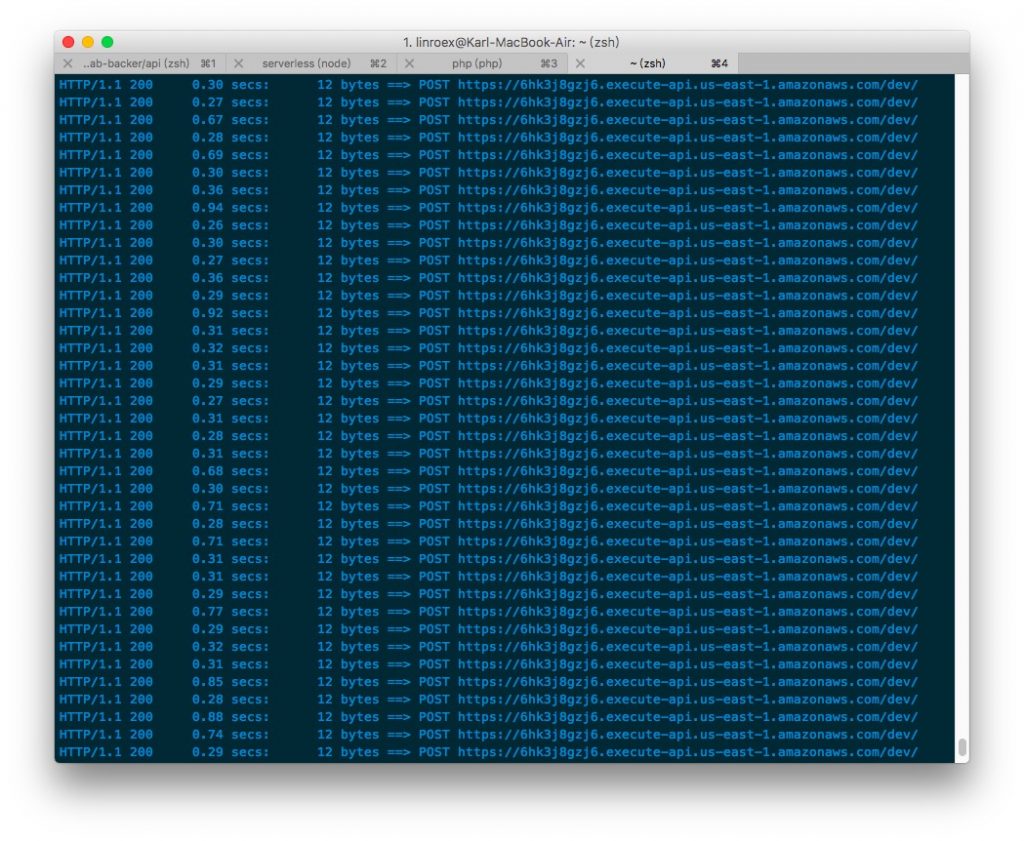
As shown above, Siege prints the progress of the run along with the response to each HTTP request. Here you can watch whether response times are trending slower and whether errors such as 404 or 500 occur. You can also check memory, CPU, and other changes on the server. But keep in mind that slower response times (and other anomalies) are not necessarily caused by your program. Often, such frequent requests cause a firewall to block your requests or even ban your IP address, so you need to work out the likely cause yourself.
Sometimes the target you want to test requires HTTP methods other than GET, such as POST or PUT, for example with an API. Although the Siege documentation doesn’t mention it, it’s actually easy to do:
siege -c 10 -r 10 "http://yahoo.com.tw/ POST"
siege -c 10 -r 10 "http://yahoo.com.tw/ DELETE"
You simply append the method after the URL. But be careful: the URL must end with a slash. For example, the following form will fail:
siege -c 10 -r "http://yahoo.com.tw POST"
In some cases you need to send data to the backend for processing. In that case, you can write the data right after the HTTP method, for example:
siege -c 10 -r 'http://yahoo.com.tw POST {"name": "karl"}'For GET, you can put the data directly in the URL, for example:
siege -c 10 -r 'http://yahoo.com.tw?name=karl'
When the test finishes, you’ll get a summary like this one for reference. It includes the total test time, the number of successful (failed) transactions, the average response time, and so on.
Transactions: 200 hits
Availability: 100.00 %
Elapsed time: 9.57 secs
Data transferred: 0.00 MB
Response time: 0.42 secs
Transaction rate: 20.90 trans/sec
Throughput: 0.00 MB/sec
Concurrency: 8.74
Successful transactions: 200
Failed transactions: 0
Longest transaction: 1.10
Shortest transaction: 0.27