With Cross-Origin Resource Sharing (hereafter CORS) settings, JavaScript can get past the browser’s same-origin policy and access resources (APIs) on other domains. But every time I set up CORS, I have a headache working out whether the server was really configured successfully. Sometimes the browser caches CORS results, so even when the server is configured correctly, the request keeps failing no matter how many times you refresh the page. Here I will show you how to use cURL to inspect the headers directly and check whether CORS is enabled!
We use cURL to simulate the browser’s behavior and request a resource from the server. CORS actually works by adding the Access-Control-Allow-Origin header to the response, so the browser can handle the rest. That means you only need to check whether Access-Control-Allow-Origin appears in the headers to know whether the configuration is correct. This is the lowest-level approach. If you check this way and find no Access-Control-Allow-Origin, then there is no doubt the server is misconfigured!
curl --verbose -XPOST "https://coder.tw"
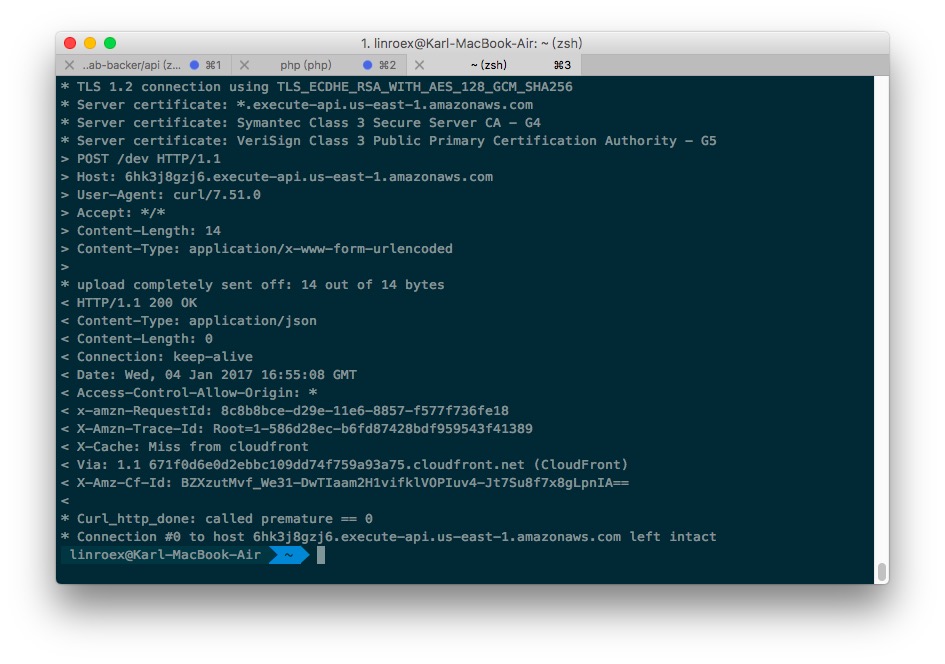
It is actually very simple: just add the -verbose option so that cURL lists the detailed process. If the response contains “< Access-Control-Allow-Origin”, it means CORS is set up successfully. Of course, you also need to check that the domain you configured is correct.