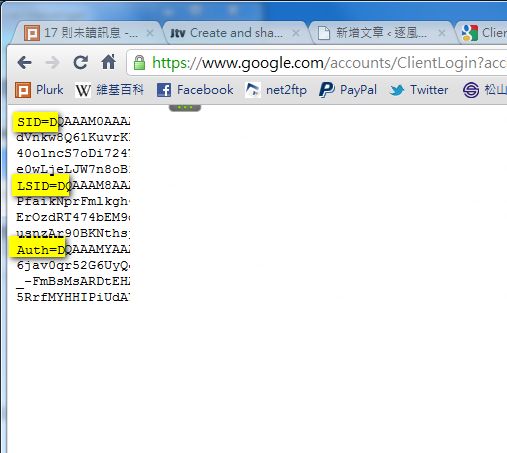
Google offers many APIs that make it easy for you to access its services. For example, the Google Contacts API requires you to get permission before you can use it. In this post, I’ll cover ClientLogin, which I personally think is the simplest way to get permission. It works in a simple way: you send your account name and password to Google over http, and Google sends back a string of data that includes an authorization token. With that token, you can access Google’s various services (such as Contacts, Calendar, Notebook, and so on).
ClientLogin is actually better suited to desktop or mobile apps. Unlike other authentication methods, it doesn’t require opening an authorization page, so you can design your own login screen for users to enter their account name and password. But this approach has a drawback: users may not want to type in their password, because they might suspect you of being a phishing site…
ClientLogin Basics
Request format:GET https://www.google.com/accounts/ClientLogin?accountType=A&Email=B&Passwd=C&service=D
The line above means sending a GET request over http. Note that letter case matters.
Parameters:
- accountType: The type of account to get permission for. HOSTED_OR_GOOGLE is the safest option. The available options are GOOGLE, HOSTED, and HOSTED_OR_GOOGLE.
- Email: The account to get permission for. It must include the part after the @. For example, in my case: linroex@gmail.com
- Passwd: The user's password
- service: The code for the service you want to use. For example, if I want permission for Google Calendar, I enter cl here. You can find the codes for each service on Google Code.
- source: Optional. It just lets Google record who is accessing the service.
https://www.google.com/accounts/ClientLogin?accountType=GOOGLE&Email=admin@gmail.com&Passwd=123456789&service=clReturn values:
Normally, the ClientLogin response should include three values: SID, LSID, and Auth. Auth is the authorization token, and with it you can access other Google services. If authentication fails, it returns other codes instead. I’ll explain what those codes mean below.
- BadAuthentication: Wrong account name or password
- NotVerified: This account has not been verified yet
- CaptchaRequired: The CAPTCHA is missing
- Unknown: Unknown error
- AccountDeleted: The account has been deleted
- AccountDisabled: The account has been disabled
- ServiceDisabled: The specified Google service does not exist
- ServiceUnavailable: The specified service cannot be reached right now. Try again later.
PHP ClientLogin Example
Download links: Box.net|Dropbox|Google|4SharedCode:
	$connect=curl_init();		//create curl
	$user="linroex@gmail.com";		//set the account
	$passwd="";		//set the password
	$service="cl";			//set the service to authenticate
	curl_setopt($connect,CURLOPT_URL,"https://www.google.com/accounts/ClientLogin?accountType=HOSTED_OR_GOOGLE&Email=$user&Passwd=$passwd&service=$service");
	curl_setopt($connect,CURLOPT_RETURNTRANSFER,true);			//return the data as a string
	curl_setopt($connect, CURLOPT_SSL_VERIFYHOST, true);		//use an SSL connection
	curl_setopt($connect, CURLOPT_SSL_VERIFYPEER, false);		//use an SSL connection
	$re=curl_exec($connect);		//connect and store the return value in $re
	$re=explode("n",$re);		//parse the data
	echo $re[2];		//display Auth
	curl_close($connect);		//close curl