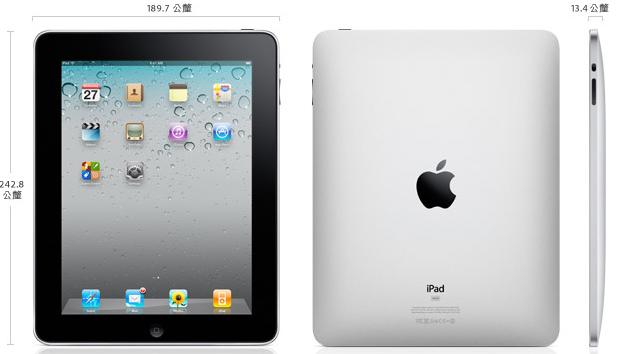
P.S. Image from the Apple iPad official site
The most common tablets on the market right now are the ViewPad (there are the ViewPad 7 and 10; this post covers the ViewPad 7), the Galaxy Tab, and the iPad. The ViewPad and Galaxy Tab both run Android 2.2, and only the iPad runs iOS. Recently the iPad finally went on sale in Taiwan (so exciting!). On launch day I rushed to Apple’s store to try an iPad. Since I still can’t afford one, I could only play with it, lol. I expected the place to be packed, but it was only a bit busier than usual, and I got my turn with the iPad right away.
Having played with the iPad today and comparing it with my earlier experience with the ViewPad and Galaxy Tab, I think the iPad will be a long-lasting product, while the ViewPad and Galaxy Tab may fade from people’s attention by next year. Many more tablets will come out next year, so my advice to anyone who wants a tablet is to wait a year or two for more choices and better prices. Personally, I think the iPad will not disappear even if many tablets come out next year, because of Apple’s brand reputation and its customer service. The ViewPad and Galaxy Tab, however, are just short-lived products. I expect everyone will have forgotten about them by next year.
Enough of that. This post introduces the ViewPad, Galaxy Tab, and iPad. I had been saving up for a tablet, so I did some research. The ViewPad and Galaxy Tab have 7-inch screens, which are quite convenient to use, while the iPad has a 10-inch screen. Personally, I think if you only browse the web, a 7-inch screen is enough. But if you want to use a tablet as a portable notebook, you should get the 10-inch model, because the virtual keyboard is bigger for typing. So screen size depends on your needs, and I won’t score it. What matters more is the resolution. The Galaxy Tab’s resolution (1024600) is high enough, but it isn’t the mainstream resolution supported by Android Market, so many apps either won’t work or look strange. The ViewPad 7’s resolution (800480), on the other hand, is quite common in Android Market, so you won’t have trouble finding apps. The iPad has no difference at all here, since it has its own App Store.
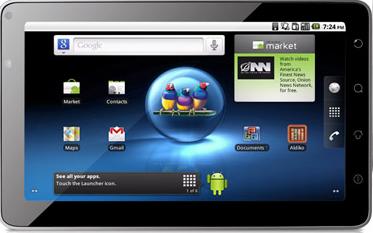
▲▲This is the ViewPad 7. It’s designed to be held in landscape orientation.
As for performance, the Galaxy Tab is the highest, followed by the iPad, and the ViewPad 7 is the lowest. The Galaxy Tab and iPad are roughly on par, since both CPUs run at the same clock speed. I recall that the iPad has only 256MB of memory, while the Galaxy Tab has 512MB. Without multitasking you don’t feel much difference, but once you turn multitasking on, the gap becomes very obvious…. The ViewPad 7’s CPU clock is low to begin with, but in my tests the lower clock didn’t have much impact. It just looked off to me.
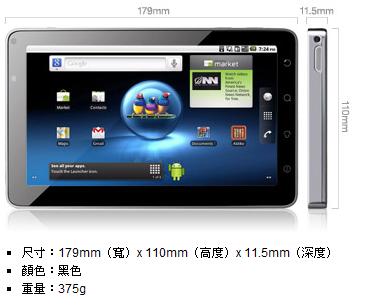
▲▲The size of the ViewPad
P.S. Image from the ViewPad official site
Also, the ViewPad 7 and Galaxy Tab both run Android 2.2, so they can play Flash, while the iPad, being an Apple product, obviously can’t. However, most people watch Flash mainly on YouTube, and YouTube automatically switches to a format iOS can play, so it’s still watchable. Fully Flash-based websites are rare these days. When I first got my iPod Touch, I wondered whether the lack of Flash would be a hassle. After a year with the iPod Touch, I’m convinced Flash was never really necessary; it only slows the system down. Of course, it depends on your needs. But if you need Flash, I’d recommend the Galaxy Tab, which is more powerful. The ViewPad 7’s performance is a bit too low, and some Flash content makes it lag.
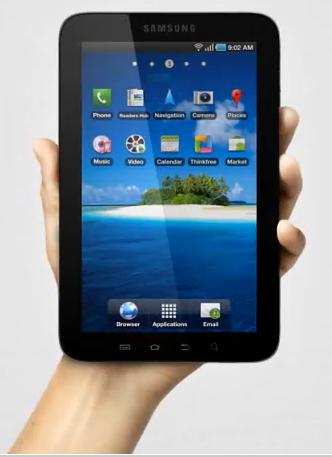
▲▲This is the Galaxy Tab. At 7 inches, it can be held with just one hand.
As for cameras, video calling has become popular since the iPhone 4 came out. The Galaxy Tab and ViewPad 7 both have a built-in front camera, but the iPad doesn’t. Some people think it’s odd to put a camera on a tablet that big, but I think it’s necessary. Here’s my scenario: when I travel, I take a tablet with me, and a built-in camera is very handy, so I don’t have to bring a separate digital camera. (My camera’s resolution may even be lower than the iPhone 4’s….. so a 4-megapixel camera on the iPad would be great.) I’ve heard the next iPad will have front and rear cameras for both photos and video calls. My plan is to wait for those cameras and then buy one. For reference, the cameras on the Galaxy Tab and ViewPad 7 are both 3-megapixel.
Finally, let’s compare details such as brand, price, and weight. The iPad has several price options, so at the lowest price, the ViewPad 7 (NT$15,000) is the cheapest, but for just NT$2,000 more you can get an iPad (NT$16,500). The Galaxy Tab is the most expensive at NT$25,000, which is a really high price….. The Apple logo gives the iPad an edge, and walking around with an Apple product feels very different. That logo stands for quality and says something about who you are. The Galaxy Tab is made by Samsung, a Korean company, and with the current anti-Korean sentiment in Taiwan, buying Samsung may not be a good idea. The ViewPad 7 is made by ViewSonic. I haven’t heard much about ViewSonic doing anything special with tablets; at most its screen is good. But the ViewPad’s screen material is the worst of the three, Orz. In terms of weight, the iPad is the heaviest (680 g), followed by the Galaxy Tab (380 g), and then the ViewPad 7 (375 g). Still, because of the Logo’s appeal, and because it’s much cheaper than the Galaxy Tab, I think I’d pick the iPad (iPad 2, hurry up and come out!).
▼▼Galaxy Tab unboxing video
▲▲The official iPad introduction video, with Chinese subtitles
Finally, I also overheard someone at Apple’s store today saying that the iPad costs about the same as a laptop but has much less performance, so it’s a bad deal. But these days, when buying 3C products, performance isn’t the only thing that matters. Often it’s about your actual needs and convenience. You can’t keep a laptop on 24 hours, can you? Carrying one everywhere is tiring too. Even a netbook weighs 1 kg, and a better one is 900 g, while the heaviest tablet, the iPad, weighs only 600 g. Plus, you can use the iPad while walking, and when you want to look something up online, you just open it. You don’t have to wait for it to boot up like a netbook. The iPad doesn’t really need to be turned off, because it’s always on. So a tablet sits somewhere between a laptop and a phone. For small things where booting a computer is a hassle, like looking up information or checking the calendar, and typing on a phone is inconvenient, a tablet comes in handy. That’s why tablets are selling well~
iPad 1st-generation unboxing post: http://blog.lansea-chu.com/index.php/archives/798
ViewPad 7, Galaxy Tab, and iPad comparison table
| iPad | ViewPad 7 | Galaxy Tab | |
| Operating system | iOS | Android 2.2 | Android 2.2 |
| Screen size | 10 inches | 7 inches | 7 inches |
| Screen resolution | 1024*768 | 800*480 | 1024*600 |
| CPU | 1GHz | 600MHz | 1GHz |
| RAM | 256MB | 512MB | 512MB |
| ROM | 16G to 64G, all available | 512MB | 16GB |
| Multi-touch | Supported | Supported | Supported |
| Bluetooth | Bluetooth 2.1 | Bluetooth 2.1 | Bluetooth 3.0 |
| WiFi | Wi-Fi (802.11a/b/g/n) | WiFi( 802.11b/g ) | Wi-Fi (802.11a/b/g/n) |
| 3G | 3G version available | Yes | Yes |
| SD | Not supported | Supported | Supported |
| Camera & video | None; reportedly the next generation will have one | Yes, 3 megapixels | Yes, 3 megapixels |
| Price (lowest) | NT$16,500 | NT$15,000 | NT$25,000 |
| Weight | 680g | 375g | 380g |