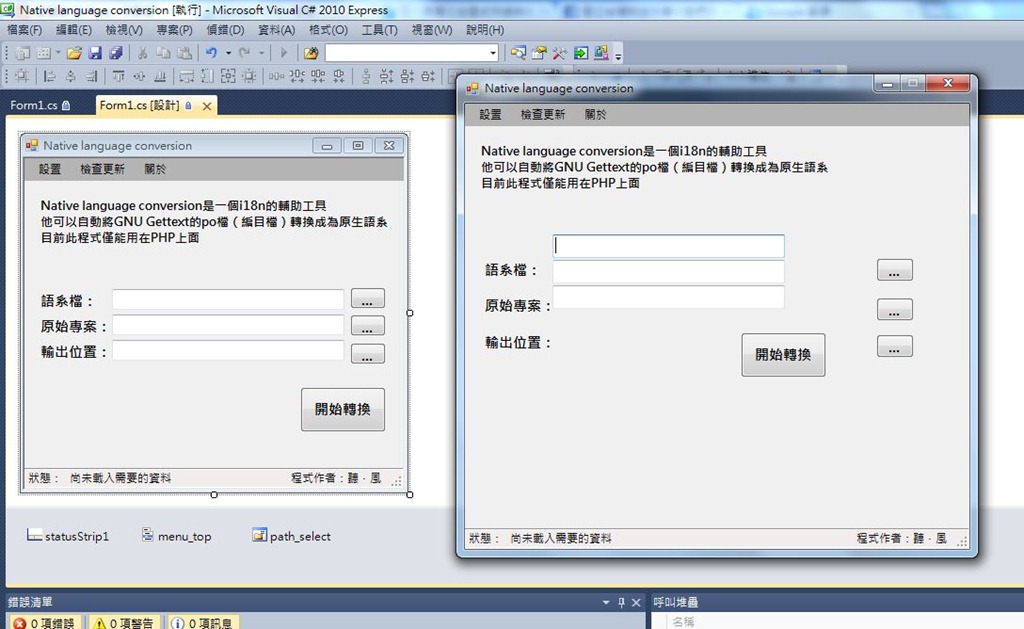
This is a problem I ran into recently while coding. If you also develop with Visual Studio and have run into a similar issue, where the UI design in VS and the result you get when running the program don’t match, I recommend checking out my fix. It’s a bit silly, but it works well XD
Problem:
I develop programs in Visual Studio. After I compiled the program, I found that the result when running it was completely different from the interface I had laid out in Visual Studio.But there was nothing in my code that would affect the interface.
Solution:
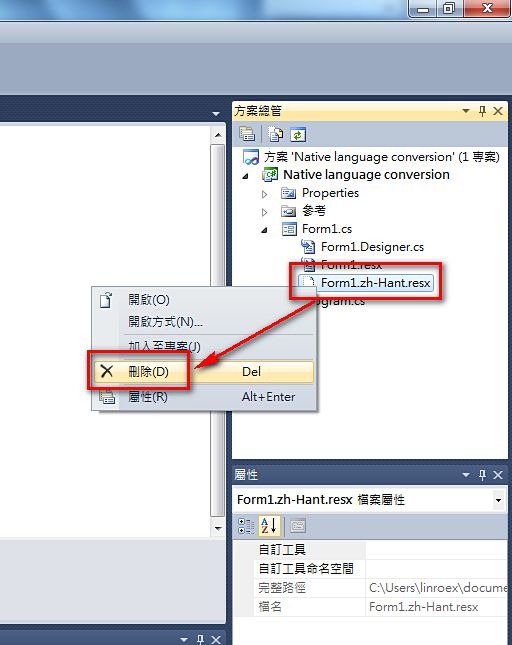
This problem may happen if you changed the Language property of the Form. Open Solution Explorer and check whether there are localization files in it, such as "Form1.zh-Hant.resx". Delete that file, then rebuild. In theory, that should fix it.You may have done the following:
1.Set the Form’s Language to Traditional Chinese
2.Moved a control
3.Set the Form’s Language back to Default
4.Moved a control again, then compiled. That’s when it gets different XD
Cause:
At first I thought this was some mysterious bug. Later, Bill told me how it works, and only then did I realize it wasn't a bug.Let me sort out my thoughts…
Here are the steps from earlier that led to the problem:
1.Set the Form’s Language to Traditional Chinese
2.Moved a control
3.Set the Form’s Language back to Default
4.Moved a control again, then compiled. That’s when it gets different XD
At step 2, the localization file Form1.zh-Hant.resx gets generated.
At this point, everything is still normal.
But in step 3, we set Language back to Default. At this point, the Visual Studio designer shows the layout from your original code. However, when compiling, the build includes “Form1.zh-Hant.resx”. My computer happens to be set to Traditional Chinese, so a problem arises here: the program checks your operating system’s language at run time and applies the matching localization file. But the localization file also contains control positions, so at run time the program applies the control positions from the localization file, while the designer uses the ones from your original code. The design and the runtime end up out of sync.