About the W3C:
The W3C is an organization dedicated to standardizing the web. It is responsible for drafting all kinds of web-related specifications. For example, the CSS4 standard and XHTML were both created by the W3C. Why create these standards? The reason is simple. Web pages are displayed in different browsers. If every browser used different syntax, web designers would have a hard time. But getting all browser vendors to agree on one standard is difficult. I think the main reason is that they're all competing with each other. That's why the W3C was created: an impartial third party drafts the standards, and each browser vendor (such as IE, Opera, and Firefox) must follow these basic rules. Of course, browsers can add their own syntax if they want. Still, not every browser follows the W3C specifications. Big names like IE don't, which is why many web designers have a love-hate relationship with IE (love, because so many people use it; hate, because it doesn't play by the rules). Now that you have a basic understanding of the W3C, let me show you how to check whether a web page meets the standards.CSS Standards:
What are the benefits of checking whether your site meets the standards? Here's a list, and you'll see~- Fewer display errors
- Faster browsing
- A cute sticker XD
Website: http://jigsaw.w3.org/css-validator/
Checking a Page Directly
I think this method is the fastest. You just give it the URL, and there's no need to upload CSS files as other methods require. I recommend this method for people just starting out in web design. This article will only cover this checking method. Feel free to try the other methods on your own. If you don't understand something, leave a comment and ask me.1.First, go to the css-validator website, then enter the URL of the site you want to check in the Address field.
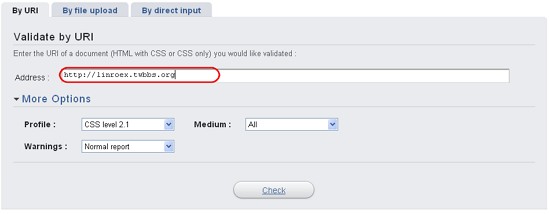
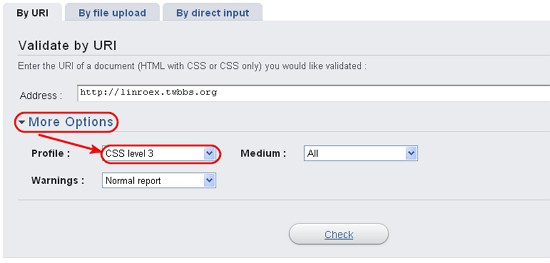
2.Click More Options, then choose the CSS version you want to check under Profile. For example, this site uses CSS level 3.
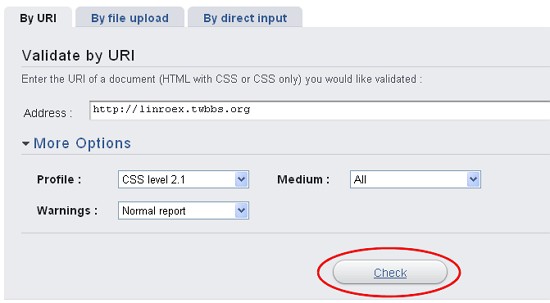
3.Once everything is set, click Check. It will start checking whether the CSS files on the page meet the standards.
Wait a moment, and a new page will appear. On this page, it will tell you the obvious errors and possible errors (Warnings). Since the page is in English, I’ll include a translation~~
Sorry! We found the following errors (4): the number in parentheses is the number of errors
Warnings (107): this refers to possible errors. I’m not really sure how to explain it, but in plain terms, it just means “warning.”
That’s roughly the main translation.
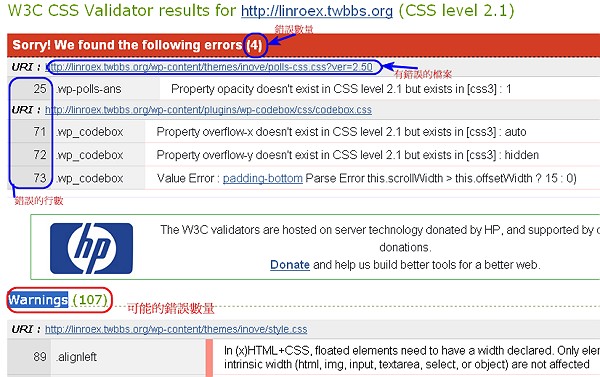
↑↑↑If you can’t understand the report, you can refer to Google Translate’s output.
If your site passes, it will also tell you. Unfortunately, I couldn’t get a screenshot of a passing result @@ Because my own site didn’t pass. But I think if yours passes, at least you won’t end up with the same screen as mine XD
Don’t be too sad if you have a lot of errors!!
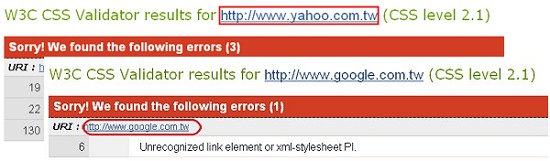
After all, even Google’s site has one error, and Yahoo’s site has three. As long as you don’t have too many errors, you’re fine. Of course, zero errors is best, because then you get a sticker^^