Today I finally updated WordPress from 2.7 to 2.8! WordPress 2.8 is said to focus on performance this time, and it doesn’t really add many features, but it does fix a lot of bugs from older versions (more than 700 of them — scary, right?). That said, WordPress 2.8 does still come with some new features (though, as I mentioned above, not many). As for the interface, it might give you the illusion that… the update was just a version number change = =, because this update keeps the same 2.7 admin interface with no obvious changes. That’s roughly all I have to say. Next, let me walk you through a few of the main new features in WordPress 2.8.
WordPress 2.8 Information
Official site http://wordpress.org/
Core program http://wordpress.org/latest.zip
Chinese language pack http://wordpress.kirin-lin.idv.tw/news/wordpress28zhtw
- Column settings
In this update, WordPress 2.8 added an option in the admin area to change the number of columns, for the convenience of widescreen users. Just click “Screen Options” and you’ll see it!

- Syntax-highlighted code viewer
This is the feature I find most interesting in WordPress. It gives the built-in plugin or theme editor syntax highlighting, though it doesn’t seem to support browsers like IE6, Opera, and Firefox. It also adds a feature for looking up PHP functions.
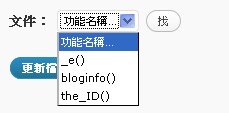
p.s. If your browser doesn’t support syntax highlighting, you may find that WordPress won’t let you edit those files. In that case, click “Disable Syntax Highlighting” under “Screen Options” and the problem goes away.

- Improved theme search
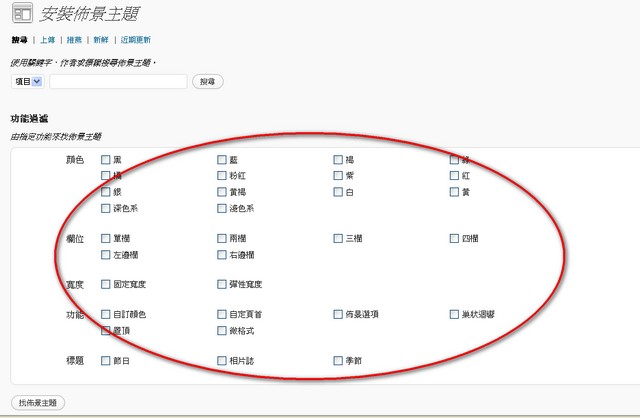
You may remember that WordPress 2.7 already had automatic theme installation and search. In WordPress 2.8, the search part has been enhanced with “filtering” capabilities, such as filtering by field.
- Setting the number of items per page in the post editing screen
This is a feature I’ve been waiting for a long time. BSPs like Wretch let you set how many items are shown per page, but WordPress 2.7 and earlier couldn’t do it. I thought about modifying it myself, but I’d only just started using WordPress, so I didn’t try XD (and it’s not just the post editing screen — other screens can be adjusted too).

- Themes can be applied directly
In WordPress 2.7, you had to preview a theme before you could apply it, which wasted a lot of time for people on slow connections. So WordPress 2.8, with its emphasis on speed, now offers the ability to apply a theme directly, making things easier for users.
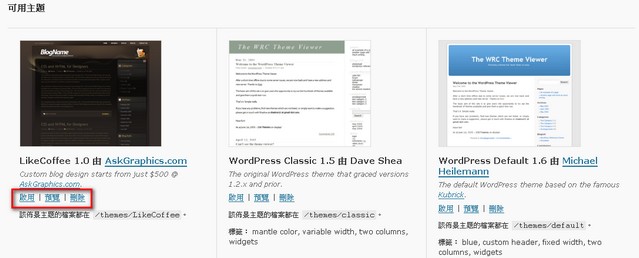
Summary: These are roughly the features added in the WordPress 2.8 update. If you want the detailed version, see the official documentation. As for updating, you can use WP’s built-in automatic update. Before updating, remember to back up your database and files, and deactivate all plugins and themes to avoid conflicts. If the built-in updater doesn’t work, you can follow [Tutorial] How to upgrade to WordPress 2.8? to update. Also, some people may find that the post editor in WordPress 2.8 no longer has the visual mode. I’m still trying to figure that one out. Some say it’s a plugin conflict, others say to try a different browser. If you discover anything new, let me know. Thanks~!